Radarr By Genesys Help and Support
Engage vs. Listen – Mechanisms and Workflows
Table of Contents
The way Radarr captures and allows action on social data depends on whether the content falls under Engage (engagement with an integrated page) or Listen (general mention capture).
Engage
The Engage module captures any content where a user is directly engaging with a social media profile that has been officially integrated and connected to the Radarr platform (e.g., your brand’s Facebook Page or X/Twitter handle).
- Mechanism: Direct interaction is supported only when a user engages via:
- A Comment on a post made by the integrated page.
- A Mention directed at the integrated page.
- A Direct Message (DM) sent to the integrated page.
- Actionability: This type of content creates a “ticket” within Radarr, allowing your agents to:
- Respond directly to the user from the Radarr Agent Desktop.
- Manage the conversation lifecycle (assign, close, escalate).
- Calculate Service Level Agreement (SLA) metrics.
Listen
Listen or Social Listening refers to the platform’s ability to monitor general public conversations across social media that are relevant to your brand or keywords, even if the content is not directed at your integrated page.
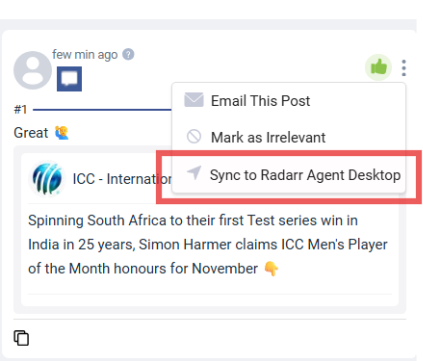
- Mechanism: If a user mentions your brand, product, or a specific campaign keyword without directly engaging with your integrated profile. Their profile, post, and sentiment can still be captured by Radarr via configured listening queries.
- Actionability: This data is primarily used for analysis, market research, and crisis monitoring. However, Radarr provides the flexibility to convert any relevant conversation captured via listening into an actionable ticket directly from the Listen Dashboards. Once converted, the interaction can be managed and handled through the standard Radarr Agent Desktop workflow.