Meta Social Media Account Authentication Issues (Facebook/Instagram)
If you are facing issue or an error while you authenticate the social media page with Radarr or unable to see the pop-pup to authenticate your Meta social media profile or page, please try doing the following, and try authenticating after each step –
Unable to authenticate
- Try clearing the browser’s cache, cookies, and history.
- Try switching to a different browser.
- Switch to a different network
- Disable any third-party browser extensions, VPNs, or proxy servers.
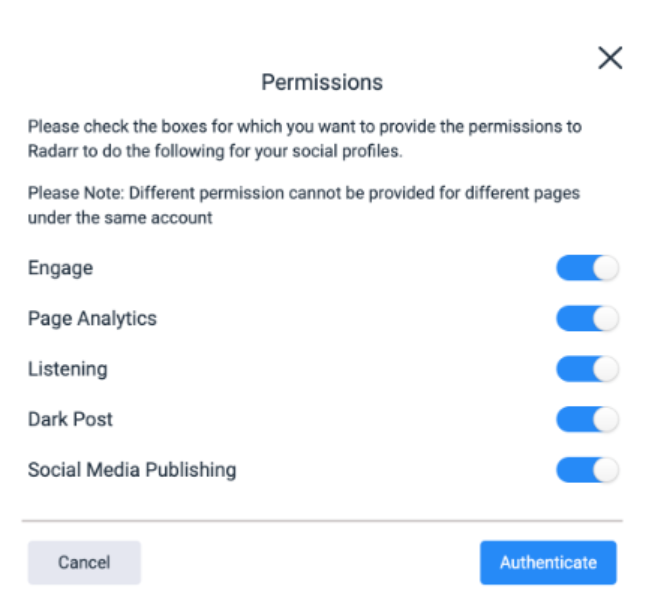
- Please enable all the necessary toggles, if disabled, when trying to authenticate as shown in the image below.
Pop-up blocked
- (a) Please Look at the far right of your Address Bar (where the URL is) after you click the button. If you see a small icon that looks like a window with a red ‘X’, Chrome has blocked the redirect.
(b) Click that icon and select “Always allow pop-ups and redirects from [Tool Name]”, then click Done. Try the button again.
- If you want to manually allow the site through Chrome’s security:
- a) Go to Settings > Privacy and security > Site Settings chrome://settings/content/popups.
- b) Scroll down to Pop-ups and redirects.
- c) Under Allowed to send pop-ups, click Add and paste the Radarr URL.
- Under Allowed to send pop-ups, click Add and paste the Radarr URL.
- Please clear the browser cache and cookies and then login to Radarr and try to re-authenticate.
- Login to incognito mode and try to re-authenticate.
Facebook.com is blocked Error
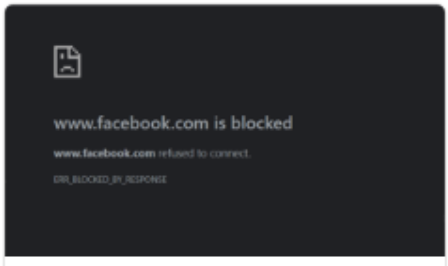
Please try the following fixes, login to Radarr and try authentication.
1. Clear browser Cache, cookies, browsing history
2. Try using different browser
3. Use a different network
4. Disable VPNs/Extensions: Turn off any VPNs, proxy servers, or third-party browser extensions.
5. Reach out to IT team to either IP whitelist or check firewall restrictions.
If the above fixes doesn’t work, please try reaching out to Facebook.
If you believe the block is in error, you can use the Facebook Help Center forms(https://www.facebook.com/help/contact/571927962827151 ) to submit a report.